The real problem is not missing data. It is missing the moment.
Most property teams already have software for maintenance, leasing, rent, inspections, and communication. The trouble is that the useful signal is spread across all of it. A request can be technically “in the system” and still sit too long. A vendor says they're waiting on access in an email nobody ties to the open work order. An owner update comes due while the notes for it are still scattered across messages and spreadsheets.
By the time somebody builds the report, it's describing yesterday's problem.
A daily digest fixes a narrower thing: what changed since the last check, which changes matter, and what should happen next? Some people call this business intelligence digest automation. I think of it as the opposite of another dashboard. A dashboard gives you somewhere to look. A digest gives you a reason to look.
This piece is the build-it companion to my broader property management automation guide. That one covers what's worth automating. This one goes deep on a single build: a morning exception brief with source-health checks, written ranking rules, and an approval queue.
Where AI helps, and where plain rules work better
Plenty of this doesn't need AI at all. Scheduled collection, deadline checks, access controls, and hard escalation thresholds should run on boring, predictable rules. AI earns its spot classifying messy messages, summarizing changes, and drafting a clean next step. Final priority still follows the manager's written policy. A model's mood doesn't get a vote.
What a useful property management digest looks like
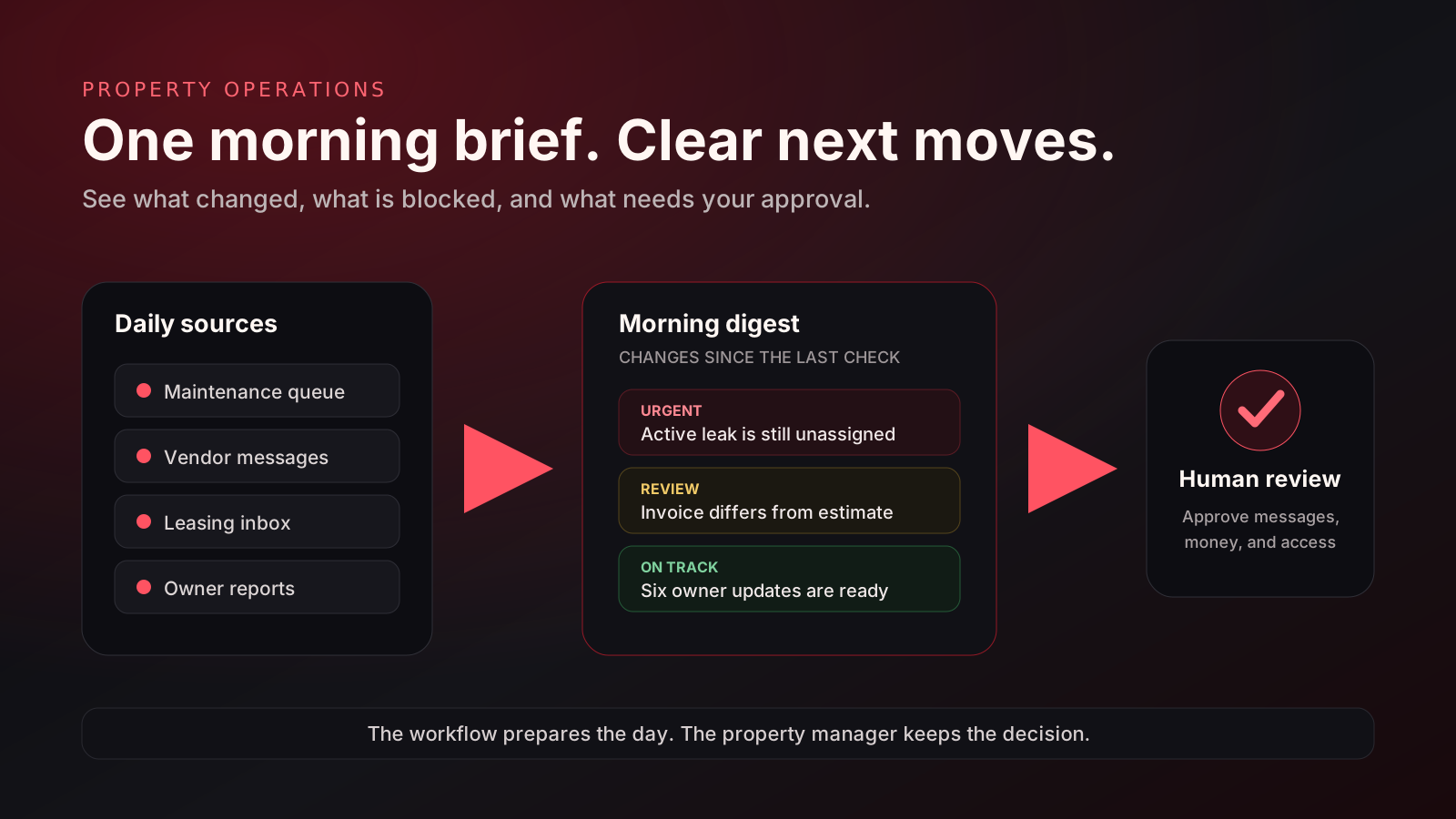
The brief has to be short enough to read before the first call of the day. Every item gets a source, an owner, and a next step. If the system can't explain why something showed up, it stays in the raw data and out of the digest.
Three new requests. One active leak is unassigned after 42 minutes. Draft vendor text is ready; manager approval required before sending.
UrgentTwo jobs are waiting on access confirmation. One invoice does not match the approved estimate and is flagged for review.
ReviewFour inquiries arrived overnight. Two need answers that are already covered by approved listing details. Reply drafts are ready, with no messages sent automatically.
ReviewFriday’s update has complete notes for six properties. Two are missing vendor ETAs and remain in the action queue.
On trackThat's a sample, and a sample can only show the shape. The real fields and thresholds come from the manager's own service standards, escalation policy, lease obligations, and operating rhythm. A sample doesn't get to set policy for your property.
The five-part workflow
Choose the sources
Start with what somebody already checks every morning. The maintenance queue, the shared inbox, vendor messages, the leasing pipeline, the inspection calendar, the owner-reporting sheet. Three sources that work beat twelve that are half connected.
Collect on a schedule
Run a read-only check on a sensible interval. For a small portfolio, that might be one morning brief plus alerts for urgent events. The system logs when it checked each source, and it says so plainly when one failed.
Compare, do not merely summarize
The system compares right now against the last check. New request, status changed, deadline coming up, vendor stalled, estimate changed. Those differences matter way more than a generic recap of everything in the database.
Rank with written rules
An emergency request, an unassigned job, and a routine update don't belong in one pile. Write the priority logic down, keep the original source attached to every item, and show uncertain classifications as uncertain. I'd rather see a flag than a model pretending it's sure.
Draft the next move, then stop
The system can prep a vendor text, a resident reply, an internal task, or a paragraph for the owner update. Then it stops. Anything that affects a resident, a vendor, money, access, or the public record waits for a person, unless that exact action was approved ahead of time.
What should be automatic, and what should wait?
My first version automates the boring prep and leaves judgment with the manager. Before collection starts, we sign off on the exact sources, permissions, fields, retention period, and who gets to see the output. Property systems hold resident details, access instructions, financial information, and complaints, so the system reads only what it needs and keeps a record of every run.
| Good preparation tasks, after access review | Actions that usually need human review |
|---|---|
| Read approved sources on a schedule | Send a resident or owner message |
| Compare status changes and deadlines | Approve a repair, invoice, or refund |
| Tag, rank, and group open items | Change access instructions or vendor scope |
| Draft replies and update paragraphs | Close a maintenance request |
| Create an internal review queue | Make a fair-housing, legal, safety, or lease decision |
The approval gate is the reason this works. It's what lets a team hand real work to automation without quietly giving the final say to a system that's missing half the context.
Three ways these systems go wrong
1. The digest repeats the dashboard
If it lists every open work order, every inquiry, and every message, congratulations, the team now has another inbox. A useful brief filters for changes, exceptions, deadlines, and blocked work.
2. A failed source looks like “nothing happened”
Silence is dangerous. A login expires or an integration breaks, and the digest happily reports a quiet morning. So it needs a source-health section you can see: checked fine, stale, incomplete, or unavailable.
3. The automation acts before the rules are settled
Don't start with automatic sending. Start with drafts and a review queue. Once the output is useful day after day, the team can think about automating low-risk internal steps, one at a time.
Start with one morning question
Skip the giant “AI for property management” project. Pick the question your team already asks every morning:
- Which maintenance requests need someone to step in today?
- Which vendors are holding up completion?
- Which resident or owner messages still need a reply?
- Which reports are due, and what's still missing from them?
Pick one question, name the sources, and agree on what counts as urgent. Run it in draft-only mode. Look at the misses and the false alarms for a couple of cycles. If the brief saves checking time or catches a real handoff problem, grow it. If it doesn't, fix the rules before you buy more software.
A dashboard shows the portfolio. A digest explains the day.
Your property management software stays the system of record. The digest is the layer a person actually works from. It gathers the scattered updates, compares them with yesterday, pulls the exceptions to the top, and preps the next action without pretending the decision is its call.
Narrow sources. Rules you can read. A short brief. And a human holding the final key.
Bring one messy morning workflow.
I'll map the sources, the priority rules, the digest format, and the approval points around the tools your team already uses. Thirty minutes, free. If it's not worth automating, I'll tell you.
Book a free 30-minute workflow audit →